Sunday, 26 June 2016

Oracle TNS names configuration. How to add TNSNAMES.ORA to toad?

What is TNSNames.ora file?
The TNSNames.ora file contains the specific information required to connect to the Oracle instance. By default, the TNSNames.ora file resides in {oracle home directory}\network\admin. For example, C:\Oracle_Client\network\admin.

If a TNSNames.ora file does not exist on the machine, you will need to create one in a text editor. We recommend storing the file in your My Documents folder as this is an easily identified folder and common on most machines. For example: C:\Users\gsbprogramming\Documents.  

Sample TNSNames.ora entry

[net_service_name]=
( DESCRIPTION=
  ( ADDRESS=[protocol_address_information] )
  ( CONNECT_DATA=
    ( SERVICE_NAME=[service_name] )
   )
)
 
You can get this entry by using TNSPING


Here XE is SID of oracle database. So we used TNSPING XE 
If SID is ORCL you will use:
TNSPING ORCL 
 
So TNSNAMES.ORA will have entry as:
 
MYTNS=
( DESCRIPTION=
    ( ADDRESS = ( PROTOCOL = TCP ) ( HOST = ErJatt) ( PORT = 1521 ))
    ( CONNECT_DATA = ( SERVER = DEDICATED ) ( SERVICE_NAME = XE ))
)
 
Here ErJatt is username . You can also use 127.0.0.1 here 
 
So write this in notepad 


Save this file as TNSNAMES.ORA in any directory (For example: C:\Oracle\TNS_ADMIN\)
 
 
As we have saved this file in C:\Oracle\TNS_ADMIN\ so we will create a TNS_ADMIN system environment variable with value C:\Oracle\TNS_ADMIN\
 
  Now tnsnames.ora will be automatically added to toad

Monday, 12 October 2015

onTouch Dictionary - pop up


The offline English pop up dictionary : onTouch dictionary by adroit apps - shows the definition/meaning of words as pop up or toast. Now word lookup is so easy. It is just like a pocket dictionary. No switching between app is required.

Get ready to download: it works offline that is only one time download and afterwards, no need of internet connection.
Here's how to use it:
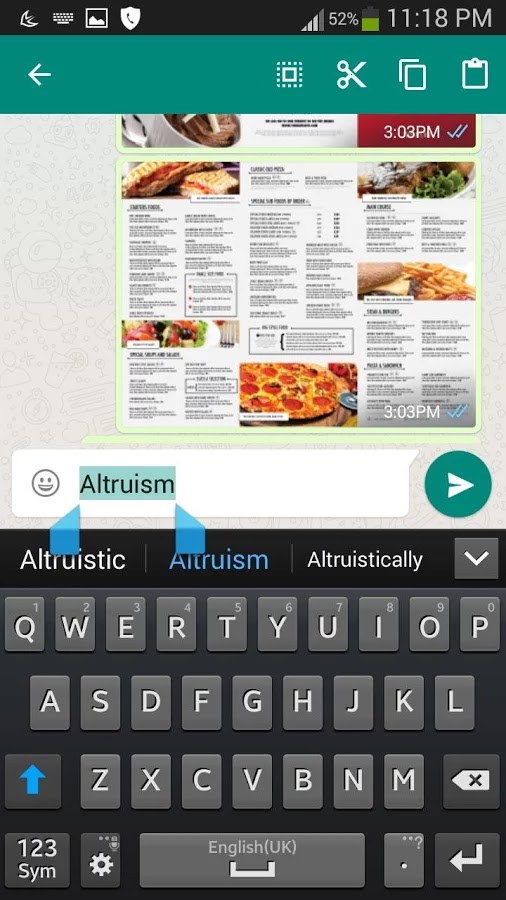
1- Hold and select the word you'd like to get the definitions/meaning.
2- Select the Copy button in the menu/Action Bar.

3- And your meaning will be shown as pop up /toast on a screen.
4- Pop up is visible until user closes it.

5- You can also hear the pronunciation of word directly from that pop up window.
Features:
* More than 450000 words
* Get an instant definition of any word. Simply select the word and then click on the copy button, and its meaning/definition will be displayed over currently visible application at instant.
* Depth search is also provided i.e. find the meaning of any word from the definition to any depth.
* Text to Speech is available, i.e. you can easily get the pronunciation of any words simply by selecting and copying the word.
* Compatible with Browsers, Moon+ Reader, WhatsApp and many more
* Fast as it is offline dictionary. (Internet connection is not required).
* The application gets started automatically during the booting up of the device, and works from the background. This feature can also be turned on/off from the settings of the main application.
* User can also look up for the definition of any word, just like any other dictionary application.
* You can also add a new word of our choice with your own sense of understanding.
* Customize the dictionary by adding new words and/or modifying the definition of existing words.
* A list of recently searched word for quick references.
Please send your request and feedback by email.
Keywords : popup dictionary, onscreen dictionary, free dictionary, English, offline dictionary, android dictionary, floating dictionary, floating pronunciation, depth search, Adroit apps

Learn PL/SQL Part 6- PL/SQL Tutorial